
Most students take notes in the same way they were first taught: write down as much as possible, as fast as possible, and hope it makes sense later. The result is pages of half-sentences that are hard to read and rarely reopened.
Notes can be much more useful than that. Done well, they help you understand material while you are hearing it, and they become the raw material for self-testing afterwards. This guide covers what the research says, how to choose a method, and a routine for before, during and after class.
Notes do two different jobs
Researchers have long distinguished between two benefits of note-taking (Kiewra, 1985):
Encoding. Taking notes makes you pay attention, select what matters and put it in your own words. That processing helps you learn, even if you never look at the notes again.
External storage. Notes are a record you can study later. For most students, this is where the bigger payoff lies.
A meta-analysis found that the benefit from simply taking notes is real but modest (Kobayashi, 2005). The larger gains come from using notes afterwards, especially if you turn them into questions and practise answering them. So a good system is designed for both: thoughtful processing in class, and easy self-testing afterwards.
Write less, think more
The most common note-taking mistake is transcription: trying to capture every word. It feels thorough, but it leaves no attention for understanding. Aim instead to capture:
The main ideas, in your own words.
The structure: how ideas relate, what causes what, what is an example of what.
Examples and worked problems, which are often more useful than definitions.
Your questions and confusions, marked clearly so you can resolve them later.
Anything the teacher emphasises: repeats, writes on the board, or says "this will come up".
Use abbreviations and symbols freely (→ for "leads to", ∴ for "therefore", ≠, ↑, ↓), and leave white space so you can add to your notes later.
Laptop or paper? What the evidence really says
A widely shared 2014 study found that students who typed notes on laptops wrote more words verbatim and did worse on conceptual questions than students writing by hand (Mueller & Oppenheimer, 2014). It led to headlines claiming handwriting is simply better.
The story has since become more complicated. A careful direct replication found the same difference in note style: laptop users wrote more, and more verbatim. But it found no reliable difference in quiz performance. A small meta-analysis of similar studies pointed the same way (Urry et al., 2021).
Two conclusions are well supported:
How you take notes matters more than what you take them with. Summarising and organising beats transcribing, on any device.
Distraction is the real laptop risk. In one study, students who multitasked on a laptop during a lecture understood less, and so did classmates who could see their screen (Sana, Weston & Cepeda, 2013).
Method 1: Cornell notes
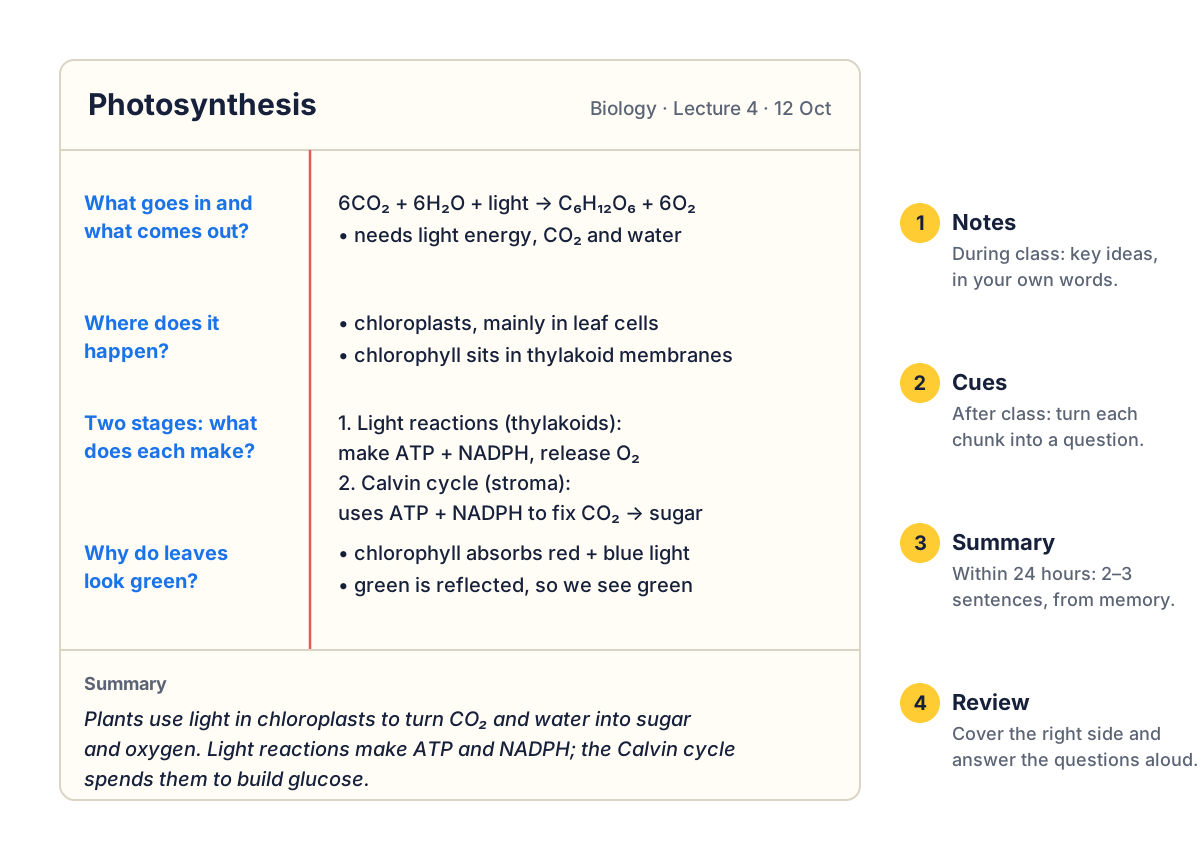
Developed by Walter Pauk at Cornell University in the 1950s, the Cornell method is popular because it builds review and self-testing into the page. Divide a page into three areas:
A narrow left column (about a third of the width) for cues: questions and keywords.
A wide right column for your notes during class.
A strip across the bottom for a summary.
How to use it
During class: take notes in the right column. Keep them brief and in your own words.
Soon after class, ideally the same day: read through and write a question in the left column for each chunk of notes. "Chloroplasts, thylakoids" becomes "Where does photosynthesis happen?"
Summarise: without looking, write two or three sentences at the bottom that capture the whole page.
Review: cover the right column and answer the questions on the left out loud. Check, then repeat on the ones you missed.
That last step is active recall, which is what makes Cornell notes more than a layout. Cornell notes suit lectures, textbook chapters and any subject where you need to remember facts and explanations.
Method 2: The outline
Outlining uses headings and indented bullets to show how ideas nest inside each other:
Causes of the French Revolution
Financial crisis
War debts (incl. American War of Independence)
Unfair tax system: nobles and clergy largely exempt
Social inequality: the three estates
Enlightenment ideas → questioning absolute monarchy
Outlines are fast and tidy, and they work brilliantly for well-organised lectures and textbooks. They struggle when a speaker jumps between ideas, or when the connections between topics matter more than the hierarchy.
Method 3: Mind maps
A mind map puts the central topic in the middle of the page, with main themes branching out and details branching off those. Popularised by Tony Buzan, mind maps are good at showing connections and work well for:
planning essays and projects,
subjects where ideas link across topics, such as literature themes or ecology,
revision summaries that fit a whole topic on one page.
Keep each branch to a keyword or short phrase, and use colour and simple drawings to make branches distinct. Mind maps are harder to use in fast lectures, so many students take outline or Cornell notes in class and build mind maps afterwards. Drawing a mind map from memory, then checking it, is also an excellent recall exercise.
Method 4: The comparison table
When a topic involves comparing several things across the same features (theories, historical periods, organisms, programming languages), a table is often the clearest format. Put the items across the top and the features down the side:
Mitosis | Meiosis | |
|---|---|---|
Purpose | Growth and repair | Making sex cells (gametes) |
Divisions | One | Two |
Daughter cells | 2, genetically identical | 4, genetically different |
Chromosome number | Stays the same (diploid) | Halved (haploid) |
Tables make gaps obvious: an empty cell is a question you haven't answered yet. They are also easy to turn into a quiz by covering one column.
Which method should you use?
Method | Best for | Watch out for |
|---|---|---|
Cornell | Lectures and readings you need to revise from | Skipping the cue and summary steps, which carry most of the value |
Outline | Structured lectures and textbooks | Copying the lecturer's slides instead of processing them |
Mind map | Connections, essay planning, one-page summaries | Hard to keep up with in fast lectures |
Table | Comparing several items on the same features | Forcing content into a table when it doesn't fit |
You don't have to pick one forever. Many strong students use outline or Cornell notes in class, tables for comparisons and mind maps for revision.
A before, during and after routine
Before class (5 minutes)
Skim the reading, slides or last lesson's notes. Write down two or three questions you expect the lesson to answer. Even a quick preview gives new information something to attach to.
During class
Listen for structure: "there are three reasons", "in contrast", "the key point is". Record ideas in your own words, mark anything confusing with a "?", and leave space.
After class (10–15 minutes, the same day if possible)
Fill in gaps and fix anything unclear while it is still fresh.
Turn the key points into questions (the Cornell cue column, or flashcards).
Write a short summary from memory.
Resolve your "?" marks: check the textbook, ask a classmate, or bring them to the next lesson.
Then schedule your first spaced review for a day or two later.
Taking notes from reading
Highlighting is the default for textbooks, and one of the least effective study techniques (Dunlosky et al., 2013). It feels productive but asks very little of your brain. A better approach:
Read one section, a few paragraphs at most, without writing anything.
Close the book or look away and write the key points from memory, in your own words.
Check the section and add anything important you missed.
This read, recall, check cycle is slower than highlighting, and it produces far better notes and far better memory.
Watch: note-taking methods compared
This Crash Course episode compares the main note-taking methods and gives practical advice for lectures and reading.
Frequently asked questions
Should I rewrite my notes neatly?
Only if rewriting involves thinking: reorganising, summarising or turning points into questions. Copying messy notes into neat ones takes a lot of time for little benefit.
Should I copy the lecturer's slides?
No. If slides are shared, annotate a printed or digital copy instead. Spend your attention on explanations, examples and connections the slides don't contain.
What about recording lectures?
Recordings are useful for checking a specific point you missed, but rewatching whole lectures is slow, passive review. Use your notes and questions as the main study tool.
Is digital note-taking software worth it?
Apps such as OneNote, Notion or Obsidian make notes searchable and easy to link, which can help for long courses. The same principles apply: fewer words, your own phrasing, and questions you can test yourself with.
References
Dunlosky, J., Rawson, K. A., Marsh, E. J., Nathan, M. J., & Willingham, D. T. (2013). Improving students’ learning with effective learning techniques. Psychological Science in the Public Interest, 14(1), 4–58. doi.org/10.1177/1529100612453266
Kiewra, K. A. (1985). Investigating notetaking and review: A depth of processing alternative. Educational Psychologist, 20(1), 23–32. doi.org/10.1207/s15326985ep2001_4
Kobayashi, K. (2005). What limits the encoding effect of note-taking? A meta-analytic examination. Contemporary Educational Psychology, 30(2), 242–262. doi.org/10.1016/j.cedpsych.2004.10.001
Mueller, P. A., & Oppenheimer, D. M. (2014). The pen is mightier than the keyboard: Advantages of longhand over laptop note taking. Psychological Science, 25(6), 1159–1168. doi.org/10.1177/0956797614524581
Sana, F., Weston, T., & Cepeda, N. J. (2013). Laptop multitasking hinders classroom learning for both users and nearby peers. Computers & Education, 62, 24–31. doi.org/10.1016/j.compedu.2012.10.003
Urry, H. L., et al. (2021). Don’t ditch the laptop just yet: A direct replication of Mueller and Oppenheimer’s (2014) Study 1 plus mini meta-analyses across similar studies. Psychological Science, 32(3), 326–339. doi.org/10.1177/0956797620965541



Discussion